Home / Industries / Heavy-Duty Truck
Heavy-duty truck dealers

Know what happened on every visit. And what every account buys.

Your truck and parts reps talk through the visit in the cab, and Voze writes it up on the account before the next stop. On Karmak, Procede, and CDK, that customer's parts orders from your DMS sit right next to the notes.

DMS partners
Procede · Karmak
Works with
CDK
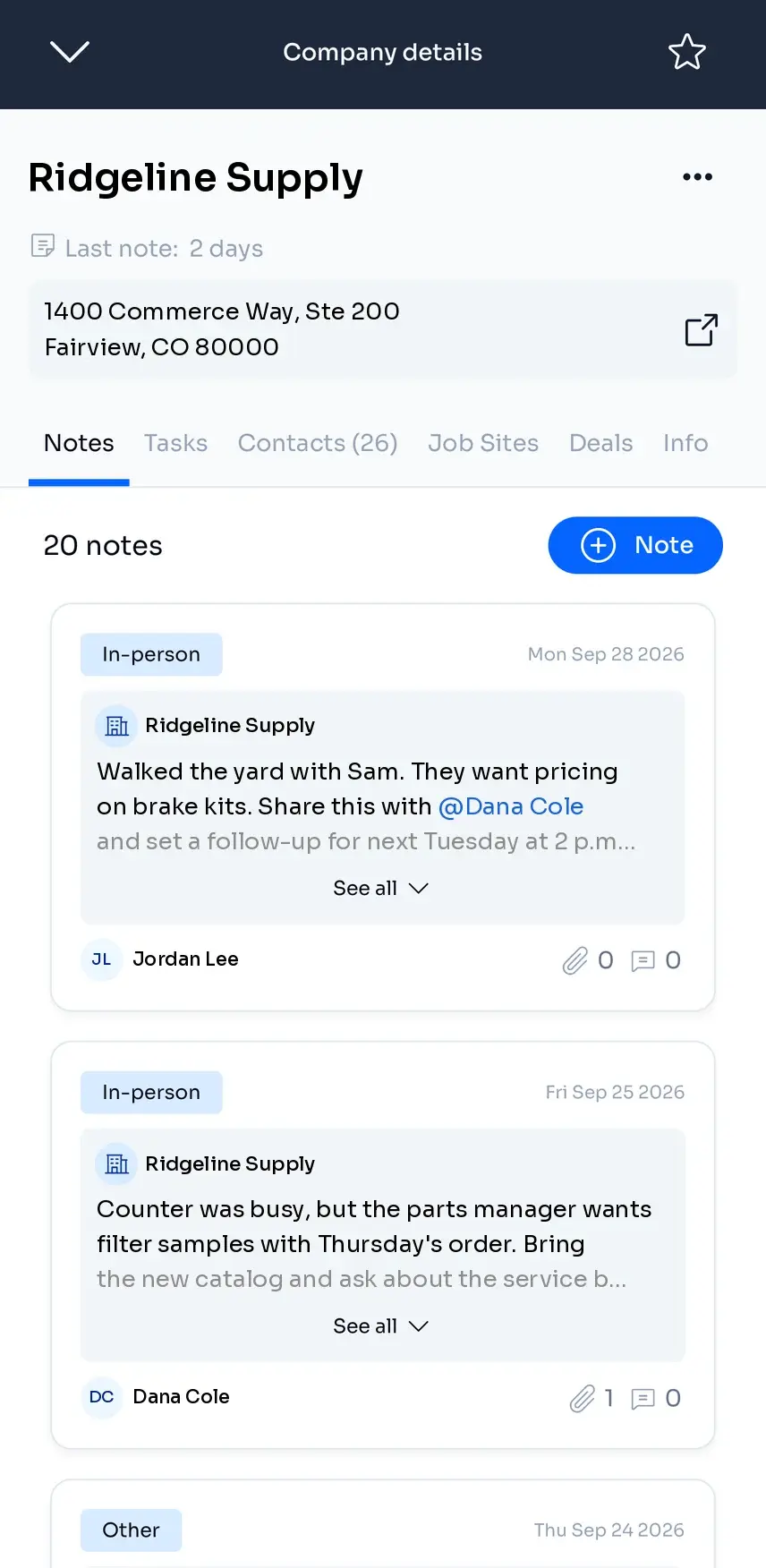
Voze Pro company page with visit notes from two reps.
Voze Pro Sales tab for a fleet account, with parts flagged as a new win or overdue.
Voze Pro
The problem in heavy-duty truck

Reps see everything. Almost none of it makes it back.

Three patterns we hear from heavy-duty truck dealers before we show them Voze.

Pattern 01

Trade-in talk never makes it back.

A fleet mentions a trade-in on a visit. If it isn't written down that day, it waits for the next report, and another dealer can get there first.

Pattern 02

Parts revenue lives in rep memory.

Reps see what a shop needs and notice when a regular customer slows down. Unless it gets written down, the parts counter never hears about it.

Pattern 03

Competitive pressure shows up in lost deals.

Reps hear about a competitor's pricing at the fleet. If it stays in their heads, you find out from the bookings, after the deals are gone.

How it works

The visit, written up before the next stop.

This is what reps open Voze for every day. They talk, Voze writes it up, and the account keeps the history.

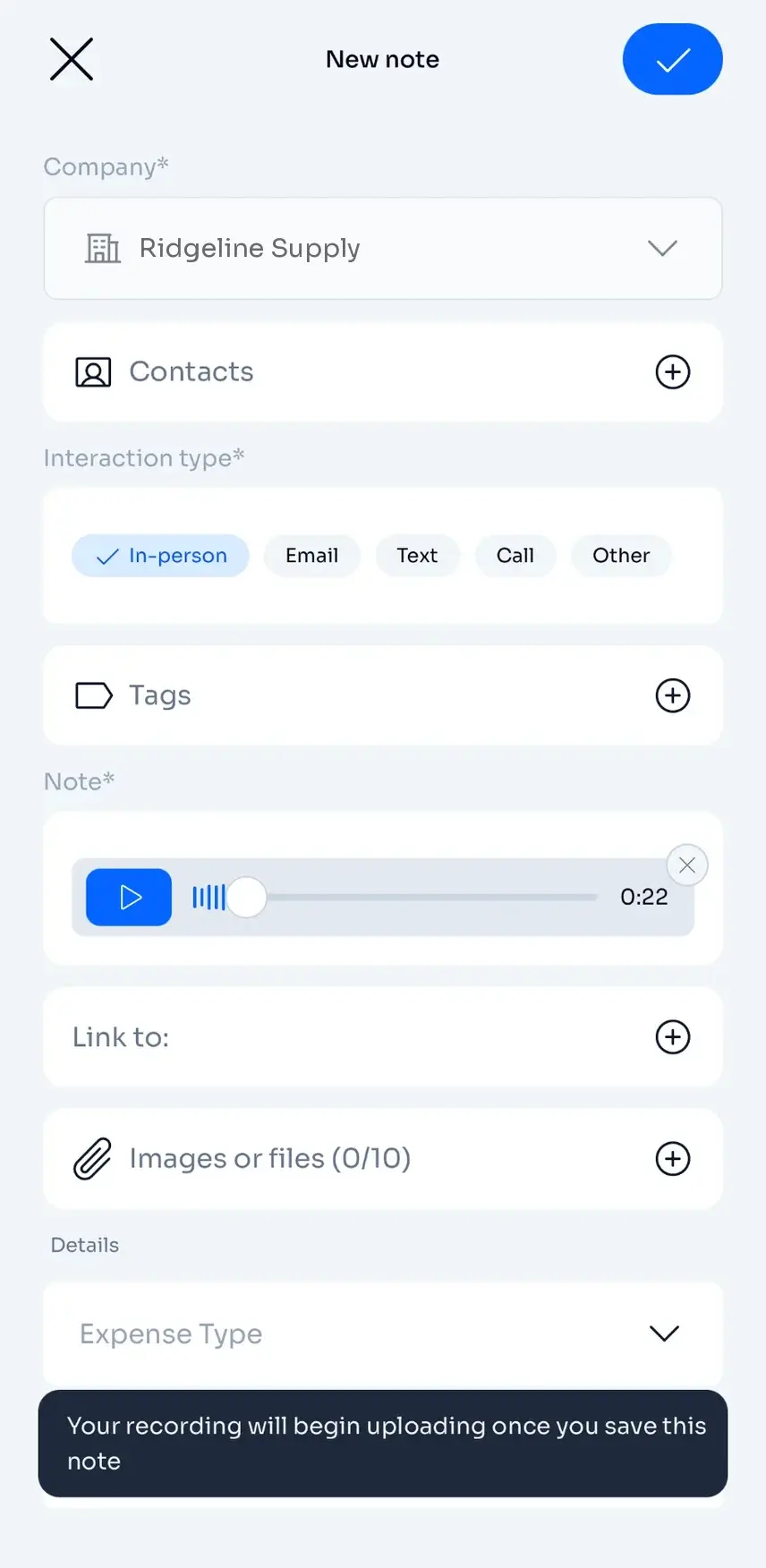
  1. Voze Pro New note screen with a voice recording attached, ready to save.

    Talk it through in the cab.

    Open the account, tap record, and say what happened and what comes next. Save it and get back on the road.

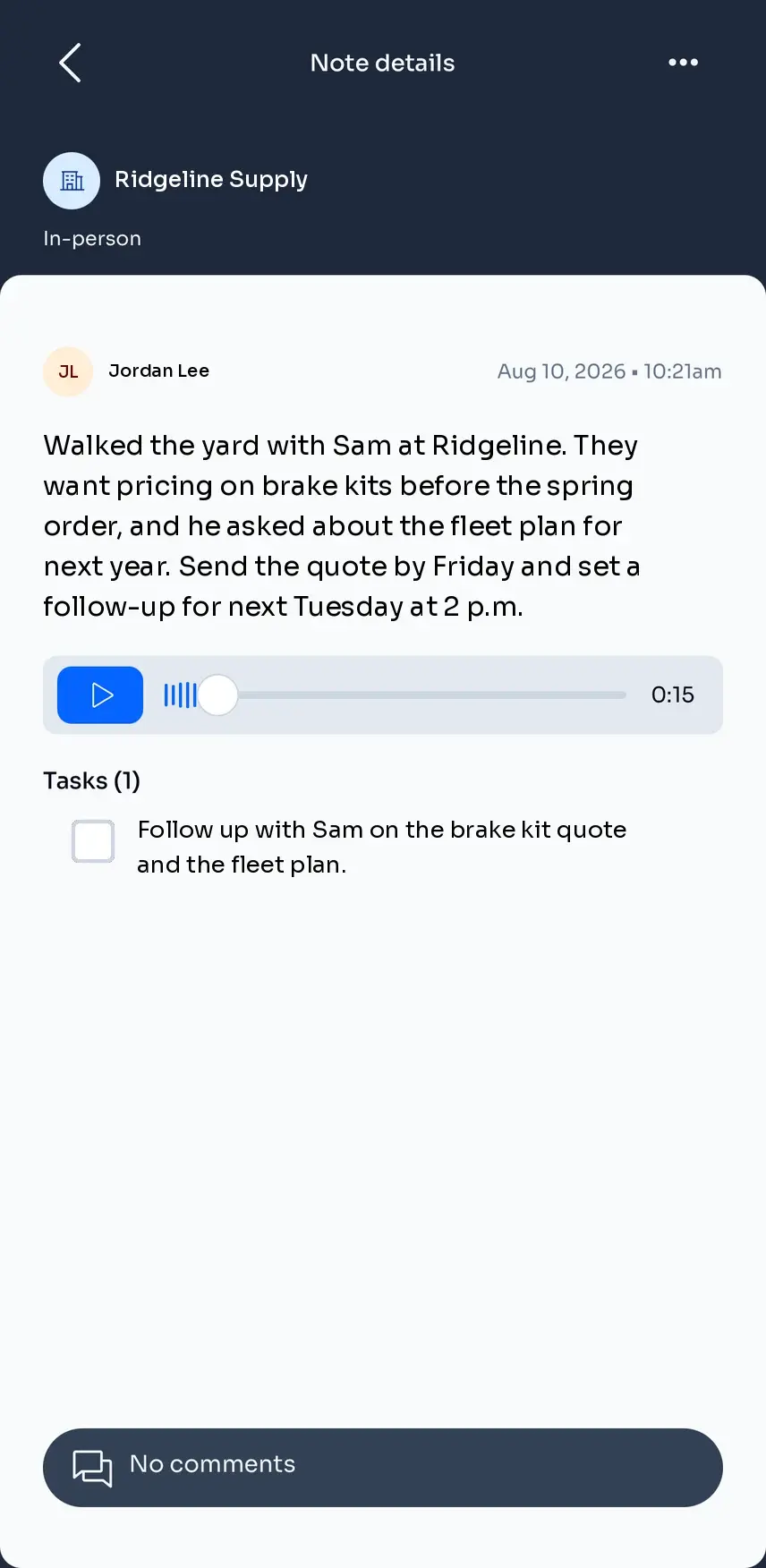
  2. Voze Pro note written up from the recording, with the follow-up as a task.

    Voze writes it up.

    The recording becomes a written note on that account, and the follow-up becomes a task with a due date.

  3. Voze Pro company page with notes from two reps, one mentioning a teammate.

    It stays with the account.

    Every note sits on the account. Mention the parts counter in the note, and they get it. When a territory changes hands, the next rep starts where the last one left off.

Screens from Voze Pro

"When you go into a place, you feel like you're prepared — you know — and you sell more when you're confident."
Allan Bumgardner, Outside Sales Rep, McCandless Truck Center · Read the McCandless story →
New in Voze Pro · Parts orders

Walk in knowing what they buy.

On Karmak, Procede, and CDK, a rep opens a company, taps Sales, and sees that customer's parts orders from the last two years. It comes from your DMS and refreshes every night.

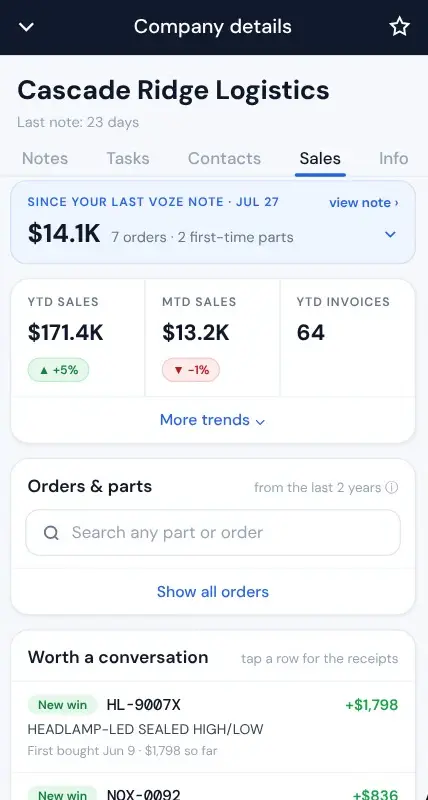
  1. Sales tab: what the customer bought since the last Voze note, with this year's sales against last year.

    See what changed since your last visit.

    Before you go in, see what they've bought since your last Voze note, and how this year compares with last.

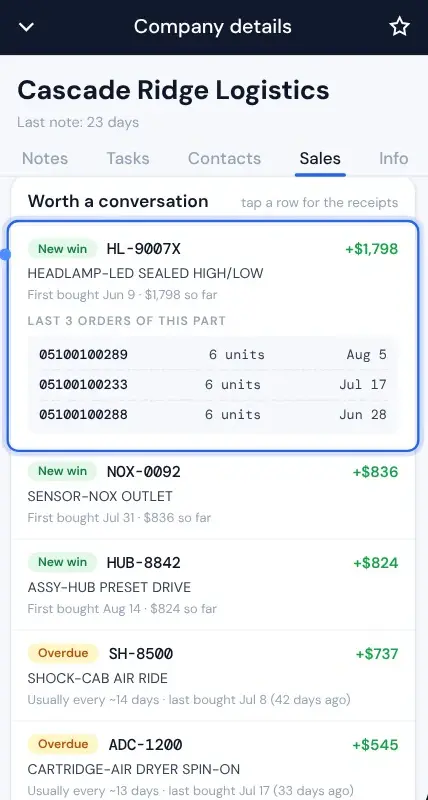
  2. Worth a conversation: a part flagged as a new win with its last three orders, and overdue parts below it.

    Get something to talk about.

    Worth a conversation flags parts that are a new win, overdue, slipping, or stopped. Tap one to see its last three orders.

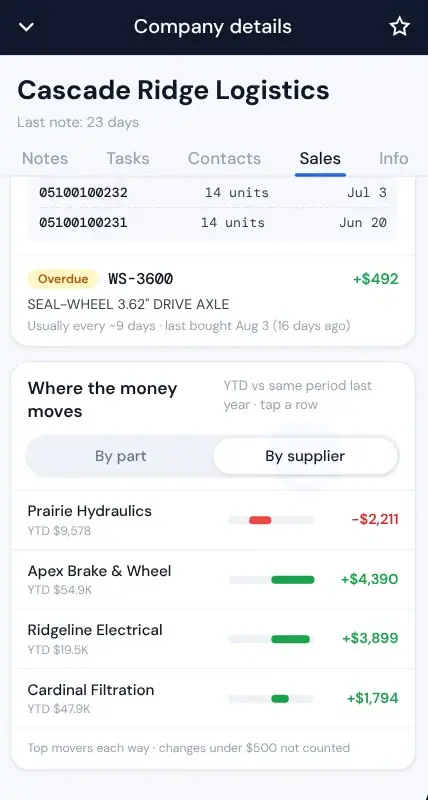
  3. Where the money moves, by supplier: which suppliers are down this year and which are up.

    See where the money moves.

    The biggest swings this year, by part or by supplier, so you know which lines are growing and which are slipping away.

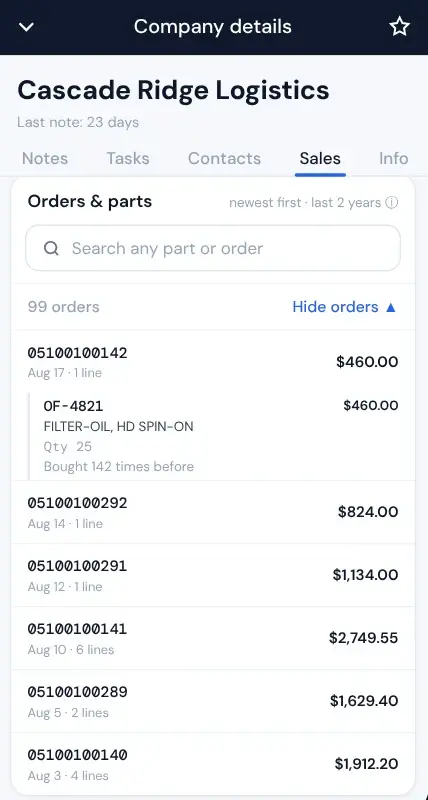
  4. Orders and parts: a search box over the customer's orders, with one order opened to show its line, quantity and price.

    Search every invoiced line.

    Two years of orders, with prices. Counter sales and parts on service orders are in.

Invoiced orders only, so today's orders show up tomorrow. Available with a Karmak, Procede, or CDK connection. Your Customer Success Manager turns it on.

Read the release note →
For parts and sales managers

Parts sales next to the visits. Coach, don't guess.

In Voze Web, the parts sales reports from your DMS sit beside your team's visits. You see which accounts got a visit and which ones bought, so your Monday talk with each rep starts from what happened.

Managing outside parts reps? Read how distributors track outside parts sales rep visits.

Sales Summary

Your parts business at a glance: month, quarter, and year to date against last year.

  • Break it out by location, rep, customer, part class, or part number.
  • See which customers are growing and which are slowing down.
  • Filter to one rep's customers before you ride along.

Date Filtered

Pick the periods you want and see them side by side.

  • Compare months, quarters, weeks, or your own ranges.
  • Switch between sales, gross profit, and quantity sold.
  • Line up this year against last at budget time.

Reps open Voze because it saves them the typing. The notes are their record of the work.

See what each DMS brings into Voze →
Integrations

Plugs into your stack.

Voze is a preferred partner of Procede and Karmak, and works with CDK, so your customer data comes from your DMS into Voze.

On Procede, Karmak, or CDK? See what connects → Don't see yours? Talk to integrations →

Heavy-duty truck FAQ

Common questions from dealer principals.

Which DMS systems bring parts orders into Voze?
Karmak, Procede, and CDK. Reps see each customer's invoiced parts orders from the last two years on the Sales tab in Voze Pro, and managers get parts sales reports in Voze Web.
Does Voze change anything in our DMS?
No. Data comes from your DMS into Voze, and your DMS stays the system of record.
How current is the parts data?
It refreshes every night, so today's orders show up tomorrow. The Sales tab shows invoiced orders, counter sales and parts on service orders included. Open orders and quotes aren't in it.
Can my parts and service team see what reps hear?
Yes. When a rep's voice note includes a follow-up for parts or service, Voze turns it into a task, and the task can go to the person the rep names, like your parts manager. The rep doesn't have to remember to forward it.
What about reps who never type up their visits?
That's who Voze is for. A rep talks through the visit instead of typing a report, so the notes get done from the cab.
How long does rollout take across multiple dealerships?
It depends on how many locations and reps you have, so we plan it with you. It starts with a short training session at each location. Then we work with your sales leadership to fit Voze to how you sell.
Heavy-duty truck · Demo

See what your lot already knows.

A 30-minute demo built around your dealership group, your DMS, and your reps. We'll show you the rep app, the parts orders on the Sales tab, and the reports your managers would use.

Have outside reps selling parts to fleets? See Voze for dealer outside parts sales →

Thinking about building your own field app? Read the build-or-buy guide →

No credit card · 30-min call · We come prepared